A gift with a shared story
Pair a meaningful place with a date or dedication for a wedding, anniversary or housewarming gift.
 Contour FoundryMAPS FOR MAKING
PRINT & FRAME / Map posters
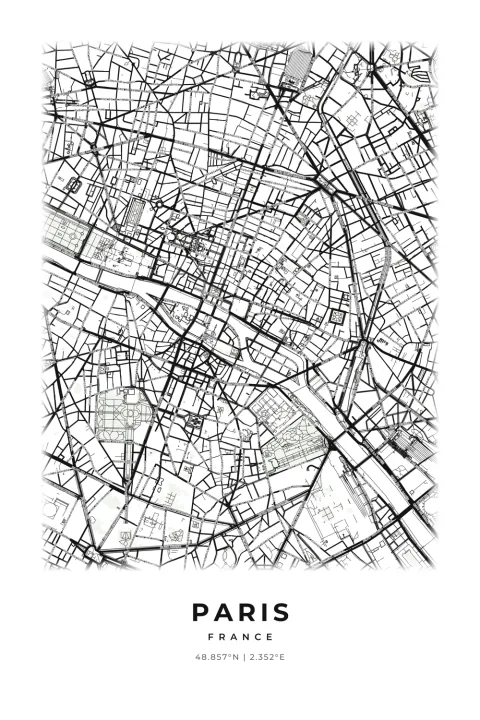
The city where you met. The neighborhood you call home. The trip you still talk about. Design a personal map print with your colors and words, then download high-resolution files to print at home or through your favorite print shop.
Personalized JPG or PNG artwork, with print sizes for a frame you love.
2 credits per finished generation · Free previews · Digital download
START WITH SOMETHING PERSONAL
Pair a meaningful place with a date or dedication for a wedding, anniversary or housewarming gift.
Use the same colors and proportions across several designs for a coordinated wall of cities and memories.
Choose quiet neutrals, deep contrast or your own colors, then match the artwork to your paper and frame.
INSIDE YOUR DOWNLOAD
A ZIP brings your finished files together. Extract it on your device to use the contents in your software.
Choose JPG for smaller files or PNG for lossless image detail. Your ZIP contains the selected format at full export resolution, with 300 DPI print metadata.
Generate one image in your selected proportion, five images with the largest size for each proportion, or all 15 supplied sizes. Portrait and landscape orientations are available.
PRINTING-NOTES.txt explains the print workflow. START-HERE.txt introduces your package, and design-settings.json records the settings used to create it.
The complete collection contains these 15 sizes. The largest-per-proportion option supplies five images. Single-proportion exports use 60 × 90 cm (2:3), 21 × 28 in (3:4), 40 × 50 cm (4:5), 25 × 25 in (square), or A1 (ISO). Smaller examples below can be printed by scaling down without changing the crop.
| Print proportion | Sizes supplied in the full collection | Ways to frame it |
|---|---|---|
| 2:3 | 16 × 24, 20 × 30, 24 × 36 in; 60 × 90 cm | Tall statement prints; also scales down to 8 × 12 in. |
| 3:4 | 18 × 24, 21 × 28 in | A balanced rectangle; also scales down to 12 × 16 in. |
| 4:5 | 16 × 20, 20 × 25 in; 40 × 50 cm | A classic frame shape; also scales down to 8 × 10 in. |
| Square | 18 × 18, 23 × 23, 25 × 25 in | Gallery walls and matching sets. |
| ISO A | A3, A2, A1 | Standard A-series paper and frames. |
MAKE IT YOURS
Start with the defaults, then adjust the details that matter to you. Help icons explain the settings, and free previews let you review the result before generating finished files.
PUT YOUR FILES TO WORK
Choose the location, colors, captions, orientation and print proportion. Update the free preview until the crop and lettering feel right.
Choose your file format and size collection, then confirm Generate files. When it is ready, use Download ZIP and extract the images.
Upload the matching image to your print provider or open it in your printing software. Select the intended size and check the crop. For an exact supplied size, use 100% scale rather than automatically fitting the page.
Choose paper and a frame that suit your room. For smaller prints, check that street names remain readable. Your local print shop can help with paper choice and a proof.
BEFORE YOU CREATE
The supplied images are rendered for their listed dimensions at 300 pixels per inch, with matching print metadata. Choose a supplied size or scale down within the same proportion. Enlarging beyond the supplied size reduces detail per inch.
Choose one format per generation. JPG is convenient for smaller file sizes; PNG preserves image detail without lossy compression. Your ZIP contains the format and collection you selected.
Yes, if its proportions match. A 16 × 20-inch image can print at 8 × 10 inches. Changing proportions may crop the map, so use the corresponding ratio when available.
This is a digital download. You arrange printing and framing, which lets you choose your own paper, finish and supplier.
Explore your settings and generate a free preview. Choose Generate files and confirm the displayed credit cost when you want the finished package. Once generation completes, use Download ZIP. A failed generation returns its reserved credits. Downloading the same completed package again is free while it is available; generating another package uses credits.
START WITH YOUR PLACE
Create an account, verify your email and explore your design. Purchase credits when you are ready to generate finished files.
Create your first map2 credits per finished generation. Software, machines, materials, printing and physical delivery are not included.